Tuesday, February 18, 2025

Career Conservationist has some Glitches

Although I've had the Island Living expansion pack for several years, I just never gotten around to trying the career of Conservationist. Now don't get me wrong, my Sim has done plenty of cleaning up around the island and improving the environment, but never went so far as to make a career of it. 

The career has two tracks, Marine Biologist and Environmental Manager.  I also didn't realize that the job can be done "from home" allowing the Sim to do other tasks during the day. So this allows a Sim to live in another World and still get some of the activities done by using a PC from home.  However, there are some tasks that require the Sim to travel to Sulani World to accomplish a few of the tasks, such as collecting Ocean Samples. 

Some things to consider when starting this career.  Logic skill is needed and some of the career tasks, such as research will help the Sim develop their logic. Some of the from home tasks are obscure, like "Spray an Invasive Species." It suggests that the Sim to "Survey Wildlife...." but, just what does that mean? How does a Sim find the Wildlife that can be surveyed? It turns out that Wildlife means to have the Sim Survey floating algae, plants, fishing holes, and pretty much anything else that pops up with a Conservation Icon and the "Survey" option when an object is clicked on. This is not the same as Survey Ocean Wildlife. That will involve swimming out to a buoy. Also, the Take Samples from the Ocean is not so straight forward. You may need to click around for a while on the water around the island to find a spot that a sample can be taken. The closer to the shore, where the Sim can wade, is usually where the sample can, eventually, be taken. The bottle of samples and research data will go into the Sim's personal inventory for use later. 

Research data can be sent to the Research Center to improve performance or sold to the Nature Channel for simoleons. The bottles of samples can be analyzed which turns into research data. On occasion, the sample will shatter, making it useless.  Collect more Ocean Samples.  I have noted that some areas of the ocean won't bring up the option to take samples, so the Sim may need to hunt around to find the best area to gather those samples. 

Just be aware, that some of  these tasks can take a few hours of Sims time, so be sure to take care of needs in and around these tasks. 

 
Survey or Photos of Cave

 
Waterfalls - Another potential water sample source


The quirks that I have encountered involve Survey Ocean Wildlife n Mua Pel'am. I have searched for "How to Survey Ocean Wildlife."  It claims that the Sim needs to Survey Coral, Schools of Fish, or Sea Turtles in the ocean of Mua Pel'am after the area is "Thriving." 

Although at this point, my Sim has improved the Ecosystem of the Island's lot to Thriving, by cleaning up debris, combing the beach for trash, cleaning up the bio-hazards by the volcano, and chasing the flocks of seagulls, there is never an actual option to survey the ocean's wildlife by clicking on schools of fish or coral.  Have yet to see any wild turtles swimming. Have encountered the hatching baby turtles racing from the sands into the ocean, but the "survey" option essentially indicated that there was nothing noteworthy. That only happened once, during a full moon. 

There is a buoy in the shallow waters that provides an option to Survey Ocean Wildlife, but even when the survey task ended, the note claimed, as follows, "Swimming around and surveying proved very fruitful! Sim was able to record some important research data to study." This also provided Research Data into the personal inventory. Yet, sending it to the Research Center did nothing. It neither improved the Performance level, nor did it accomplish the Work from Home Assignment for the day. 

Survey Ocean Wildlife
 

Essentially, the Work from Home Survey Ocean Wildlife in Mua Pel'am task is not something that a Sim can accomplish, for now, based on all the attempts throughout the course of this Sim's career.  The "earnings" for that task basically are lost for the day.  The work around I have decided to use, to at least earn simoleons is to collect research data and then sell it rather than send it in for research purposes. 

On the plus side, the other deep ocean buoy that allows the Sim to Survey the Ocean Floor is totally functional at this point. If used as part of the Work from Home assignment, the Sim will get both research data and a collectible Underwater Photo worth 200 simoleons in addition to the performance wages and credits. 

 
Survey Ocean Floor


Sunday, June 30, 2024

Eco Living Career Quirks in Other Worlds

Eco Lifestyle in another world's neighborhood


 I created a Sim that was "living off the land" and off the grid while foraging, collecting, and fishing, with a very small footprint, but was not living in Evergreen Harbor world so that they could collect all the plants growing in one neighborhood over a period of three days before moving to a new lot in a new neighborhood. The Sim was working in the Civil Designer career to make a little extra income from home to allow the Sim as much time as possible to forage and fish. 

The first three Civil Designer career levels were easy peasy to deal with. But once the Sim hit the fourth level, they selected Civic Planner and issues started showing up, making it more difficult to perform the daily career tasks. For example, one of the tasks is Interview about Neighborhood Action Plans (Interview another Sim about Neighborhood Action Plans at a Community Space Venue.) Long story very short, I needed to put a Community Board on my Sim's current lot, invite someone to hangout at the lot, and then I could interview them. It was the ONLY way to interview another Sim.  

I searched the internet with the following question.  "I can't seem to interview another Sim about Neighborhood Action Plans or Utilities."

I also learned that the option to Interview another Sim won't always pop up easily unless the Sim is on your lot along with the Community Board also situated on your lot. If the interview options won't show up when you start to chat with another Sim, select the "Other Choices," "Friendly," then select "Interests." This section is the chat area that will allow your Sim to Interview. However, again, as pointed out, you may need to invite that Sim to your neighborhood lot, making certain that the Community Board is also on your lot. 

In other words, IF you "scroll" through the chat options under the "Interests" section, and there are no "Interview...." choices to choose from, you will need to ensure that there is a Community Board in the neighborhood, as described above. 

Another issue has been to Rally Votes.  If you don't have a bunch of Sims on the lot with the Community Board at the time you initiate the Rally, you have wasted your Sim's time and energy. Your Sim can't rally again for several hours. 

If I encounter any other issues, I'll add them to this page as my Sim continues to work their way to the top of the career outside of Evergreen Harbor. 


Monday, April 24, 2023

Plants Keep Mounding - WTF?

I have looked for answers but it just seems to be a common Sims 4 game glitch. Why do my plants keep dying, or why won't my plants grow?  Sometimes this happens every 24 hours (Sims Time) and other times, after about a week of plants working/living then suddenly, they revert back to mounds. Also, I note that some plants don't revert right away, but the number of activities that can be performed on the plant drops down to four; Tend, Fertilize, Talk, and Uproot. I can tell when the plants are "normal" by the amount of options, when my Sims has a level 10 gardening skill. The only way I can get the plants to work/grow produce again, so that I can harvest them the next day, is to go into build mode, put the plant in the building inventory then pull it back out and place it back onto the lot. The plant will normally become viable again. But when the game keeps doing this every 24 Sim Hours, it gets a bit crazy making. Seems like it is worse after a game update. The examples below happened right after my Sim harvested the plants right at 7:00 am Sims Time. Holidays and Season changes also seem to have an impact on this happening.  


Anyways, and regardless, the only solution seems to be to take each plant that is only showing four activity options, and put it into the building inventory section, then reposition them onto the lot before the next day's harvesting. 

After the inventory process, the plant or mound should then show six, seven or more options that it is "viable" again or that it will bear fruit again the next day. 

Sunday, April 9, 2023

Sims 4 Gardening Skills Whim - Revive a Dead Plant

 Recently encountered this whim that was frustrating as all get out! 

Revive a Dead Plant. 

It's Alive! It's AAALIVE!

Click on Plant and Select Revive Plant. 

Sims can unlock this interaction by increasing their gardening skill and collecting twigs. Twigs can be gathered through shaping Bonsai or harvesting plants.


My Sim has level 10 Gardening skills, and has the Freelance Botanist Aspiration. Um.... No, twigs cannot be gathered while shaping a Bonsai, nor after shaping the Bonsai. There are no twigs that can be gathered after harvesting plants. This may be a whim from an older Sims version.  I remember that with Sims 3 we could revive dead plants because I used to revive the Death Flower plant so that I could harvest one more extra flower before the plant went kapoot.

Just to test this one out, I intentionally killed a perfect plant by taking too many cuttings from the plant. The only options for the dead plant were to dispose of it, or to hire a professional gardener.  I changed the qualities of the lot for better gardening and went through all the Sims moodlets that were positive.  I tried Inspired, Confident, Focused, Happy, Flirty, and Energized.  I did not try Playful or Angry, with the assumption that those would not be helpful, but I might try them at another time, and report back later. I haven't had a Death Flower in a really long time, so I will try obtaining a Death Flower to see if having one of them in my inventory gives me revival power. 

Update.  My Sims tried using the Green Thumb reward via Aspirations and that didn't help with reviving a dead plant.  The dead plant is still in the mound now, with a stem sticking up out of the ground. My Sim can "talk" to the stem, and it can do a few other activities to the stem, like uproot, etc., but still the plant is essentially dead. Having a Death Flower does not help revive the plant. 

Thursday, April 6, 2023

Sims 4 Cottage Living and How to Raise Chickens

Sims 4 Cottage Living Chicken Coop

I have to say that I am really enjoying the Cottage Living expansion. The animals are fun and the activities involving them are entertaining. I started with chickens and it took me quite a while to figure out how to get them to become Golden and Evil. Both breeds are basically, created the same way, but the problem involves getting the Golden Treat and the Midnight Treat for the first time. Until you get the treat, you have no way of feeding it to your chicken, and as such, have no recipe to create the treat. I finally figured out several ways to get these treats. Make certain to grow extra CowBerries to use for making the treat.

The garden shop in Finchwick Village sells many treats, but the most rare are the Golden and Midnight Treats.  The only time you might be able to buy them from the garden shop are on Saturday, during the Fair event. However, there is only a small window of opportunity, because the shop stops selling items at 7:00 pm and the Fair doesn't start until 3:30 pm. Getting lucky to get there at the right time, and finding either of these treats is the starting point.  

Another way to get either of these treats is by befriending the wild rabbits or the flock of wild birds in  The Bramblewood or Old New Henford sections in the Henford-on-Bagley World. Start early in the day and be prepared to spend some time there. Bring a few gifts, like eggs, produce, flowers, canned foods, drinks, etc. to befriend the wild animals, along with talking, watching, and listening to them. Once you have befriended some of the wild rabbits or birds, you can purchase a rabbit and/or bird stump to put onto your Sims' home lot, so that you can continue to interact with them on a daily basis to the point that they start giving you daily gifts of rare and unusual items. In time, you will even be able to get the animals to help with gardening chores.  

The flock of birds stump will give you one gifting option per day, while the rabbit stump will have three or more rabbits that you can interact with each day and more opportunities to receive rare gifts. The rabbits do age out over time, and you need to rebuild relationships with the new young rabbits that move in.

Once you obtain the Golden or Midnight Treat, I recommend that you purchase a new hen (not rooster) and feed the treat to that hen. Golden Treat will create a Golden Hen, while the Midnight Treat will create an Evil Hen, with flames for eyes. As soon as the hen changes, you should initiate the process of making friends with the hen so that it is Happy or Very Happy every day, and will lay Golden Eggs (from the Golden Hen) or Obsidian (Black) Eggs (from the Evil Hen).  Roosters, of course, don't lay eggs, and, well, you will need these eggs in order to create a supply of treats that you can use for other things. Another very useful treat is the "Friendly Treat" that you can use to feed your special hens to improve your Sims' relationship in order to keep the hens in the happy and very happy levels. You don't treat or interact with the Evil Chicken any differently than the other chickens when trying to improve the relationship to the Sims. Mostly what I do is have my Sims talk to their chickens at least once per day using the interaction options. I don't worry about trying to maximize the relationship at first, as the daily talking and feeding Friendly Treats will do the job just fine.  I don't bother with the hugging and petting relationship options, as sometimes the birds will peck at the Sim, causing an anxiety fear. Talking and Joking never cause that fear. 

So, that's how to create a Golden Chicken and also how to create an Evil Chicken in Cottage Living. Golden Chickens will age out after about three weeks of old age, but the Evil Chicken stays young for a very long time. Having these chickens also provides specific perks. I only keep one Golden and one Evil hen along with the rest of the henss in my Sims' Coop at various stages of life since they need to be replaced every few weeks. 

I have my Sims trade their hens before the Grim Reaper shows up, and then purchase a new hen at that time to keep the coop stocked with eggs of all kinds by using the other treats. Happy and Very Happy hens of the white, brown and black breeds, will lay blue, orange, or green eggs without treats.  Special treats are needed for the other colors, like rainbow and chocolate eggs. The spicy treats will cause a hen to lay black eggs, just like the Evil hen's eggs

PS - I don't bother hatching or purchasing chicks. They don't do much and age out faster than simply purchasing a young adult hen. Almost all the chicks my Sims hatched in the coop were rooster chicks, and a few aged out and died before even becoming young adults meaning that they only ate food and took up space until they died of old age as a chick.


Evil Chicken takes on Grim Reaper

Evil Chicken fighting with Grim Reaper

Grim Reaper Recomposes after fighting Evil Chicken

Grim Reaper acts like it's leaving after the fight with the Evil Chicken

After Evil Chicken leaves the area, Grim Reaper returns to take a chicken

Grim Reaper pets the chicken, then they both vanish.

Friday, April 9, 2021

Sims 4 - Sim Can't Harvest Wild or Household Garden Plants

 My question was, "Sims 4 - How do I Harvest Plants when they won't Produce?" Not really able to find a solution, it appears to be one of those glitches that occasionally pops up. 

Background to the Problem

I had used the Create-a-Sims personality that allows you to answer some questions and the AI in Sims will create a Sims that matches the profile. This usually puts your new Sim into a career two or three levels above the starting level. My Sim came in as a Gardener, level 3, Seed Scatterer, with a level 3 garden skill. The primary personality trait was Alluring, along with Bookworm, Noncommital and Perfectionist. 

I selected a small starter home in Oasis Springs. I have Seasons and chose Spring. With my Sim's free starter seeds and the planter box (career rewards), proceeded to start planting. My Sim planted mushrooms and carrots in the garden box, with sage in the backyard, along with some grapes and a  banana tree that would not be available until later in the year. Sage should produce all year, and carrots should produce in the spring and fall. 

All seemed fine until the next day. The plants had started to mature, but nothing, absolutely NOTHING could be harvested. Typically, Wild Sage and Daisies can be harvested after an evening in that neighborhood (by 5:30 am). I had my Sim wander around the neighborhood looking for anything to harvest and eventually down to the community garden, past Zest's home, and still nothing. Spent the day doing other things on that Monday. Thankfully, the only work objective was to purchase seeds and level up to skill level 4 in Gardening. Easy enough, and handled a few other activities to whittle away the day for my Sim. 

Tuesday (Day 3), I figured my Sim should be able to harvest something. By that time, my Sim should have been able to harvest wild strawberries, sage and daisies, along with the plants in the community garden for spring, from the lemon tree, and carrots.  Got up at 5:30 to try to harvest the garden in the backyard, but absolutely nothing could be harvested. Again, all the wild plants in the neighborhood could only be viewed, but not harvested. Headed down to the community garden again. Yay!  My Sim could harvest anything in the garden boxes that were mature; the lemons, carrots, sage and daisies. So I assumed we were finally getting somewhere. Perhaps the next day (Wednesday) my Sim could harvest their own garden. 

Wednesday (Day 4), no garden plants could be harvested still. My Sim could water, weed, spray for bugs, fertilize, talk to plants, and hire a professional, but nothing to harvest either in the backyard or in the wild around the neighborhood. Again, my Sim could harvest in the community garden, and did. 

I did not know IF this was because my Sim had come in as a level three gardener, or if it had something to do with the Sim's Personality. Saving you the details, after creating a different Sim (new game) that came in as a level 3 Gardener, and moved into the same house, by Monday, that Sim was able to harvest backyard and wild plants. So it was obvious it had nothing to do with career. That new Sim had different personity traits; Collector, Good, Art Lover and Self Assured.  

SOLUTION FOUND

Went back to the earlier Sim with the harvesting deficient, and had the Sim invite a friend to move in. After an evening, by 5:30 am, Thursday morning, the Sim was able to harvest their own plants in the backyard and in the wild. So, whatever was the issue/glitch, it seemed to be fixed with a new Sim in the household to kickstart their ability to harvest their own plants, along with harvesting plants in the wild. After that, I had the friend use the computer to split from the household and move back into their original home. (PS if you have the friend split back into their household, you will end up in that friend's family - you will need to click on Manage World to get back to your original Sim's household. You can save the game if you want, but I didn't and everything switched to my Sim's household just fine.)


Thursday, March 11, 2021

Sims Eating Harvested Fruits or Vegetables Update - Moodlets

 "Living off the Land" 


Happy Moodlet +2 (3 hrs)

(From eating harvested fruits or vegetables)


-------------------------------------------------------------------------------------

"Nature's Revenge"

Nature's Revenge

Uncomfortable Moodlet +2 (3 hrs)

(From eating harvested fruits or vegetables)


When eating harvested (uncooked) produce, the Sim may feel happy, then uncomfortable, or go straight to uncomfortable, especially if the produce is normal, nice, or even excellent quality.  


--------------------------------------------------------------------------------------

When the happy moodlet pops up, well, that's the all is okay with needs as the hunger need improves immediately without other issues.  Eating produce (harvestables) that is perfect or magnificent is less likely to cause an upset stomach, but there is no guarantee with that, anymore.  

When uncomfortable moodlet pops up, the hunger need will improve a little but the bladder need will diminish quickly, sometimes with an urgency to use the toilet, even while sleeping.

Since EA updated Sims 4, consuming only harvested food is no longer a sustaining safe option for the Hunger need. Throw a slice of cake, or a bowl of cereal into your Sim's personal inventory before heading out for a long day of activities to eat before it spoils and before your Sim becomes famished. 

Tuesday, February 23, 2021

Missing Electronic Drafting Tablet

My Sim graduated from College with a Communications Degree and that allowed my Sim to enter a career as a Charity Organizer, Civic Planner, Journalist, Management, or Public Relations at a higher level.

In my case, my Sim had maxed the Public Relations career while going to college. My Sim decided to take the Civic Planner career field, but after doing that, my Sim needed an Electronic Drafting Tablet. However, the tablet was missing from the household inventory and also missing from their personal inventory.  My Sim tried to get one from the Build Mode, but it would not allow my Sim to have access even though my Sim had met the requirements level. The "unlock" description was red meaning that it was not unlocked.

Electronic Drafting Tablet

Finding no solutions readily available online. The way my Sim finally got access to the missing Electronic Drafting Tablet was to visit one of the Community Centers in Evergreen Harbor.  I usually choose The Quarry Building's Lot.  Once my Sim was there, I chose the Build Mode. Go to Electronics in Buy Mode's Object by Function. Find the Electronic Drafting Tablet under the "Misc" option of Electronics (three dots in a square). You should note that the writing is no longer in red, but is now green. That means that it is available to your Sim now. Pull out the tablet and place it on the lot where your Sim can pick it up. 

Unlocked Electronic Drafting Tablet

Then go back to Live Mode in the game while still on the lot. Click on the tablet and select the option to Draft ... Blueprint. After that, my Sim placed the tablet into their personal inventory as soon as the Sim completed the task. I did it again to get a spare one, just in case. 

My guess is that, in order to complete a lot of the Work from Home Assignments for Civic Planner, my Sim will NEED to be living in Evergreen Harbor. But, I don't want to move my Sim to one of those neighborhoods just yet. 

Hoping that helps you find the missing Electronic Drafting Tablet if your Sim is not living in Evergreen Harbor after choosing the Civic Planner or Civic Designer careers. 

Sunday, February 21, 2021

Discover University - RoomMates

 If your version of Sims 4 allows roommates, i.e. Discovery University, then you are in for an interesting and eclectic treat. The basic needs of a roommate is a spare bed and nightstand next to the bed. 

Roommates have an uncanny knack of locking themselves out at all hours and inopportune times. When you see the roommate standing out in front of the house/apartment with a key in their thought bubble, that means they have gotten locked out. You also may receive a call while out on a date or errand, asking you to come home as soon as possible (now would be better) to let them in. If your Sim (as landlord) does not immediately act to help out, you can click on the locked out roommate to establish an interaction, and click through to "Roommate" then click on the Roommate options to "Help Out." 

Roommate Locked Out

Roommates throw parties, eat your leftover food, leave trash out, leave food to rot on coffee tables, use your computer, watch your TV, play music in the middle of the night, and any other annoying situation that they can get into. If you have a garden, they will harvest it before you get the chance, first thing in the morning. But, on occasion, they will also help by cleaning, cooking, taking out the trash, or tending the garden. It is a real mixed bag of behaviors.  

Roommate's Needs

The perk is that you don't have to maintain your roommate's needs, but that's just it.  If your home does not "meet their needs" they will move out.  My Sim once used a roommate's bed, and that was enough to cause the roommate to move out. Make certain that the roommate has an assigned bed that others don't "accidentally" use. The roommates need a "quality" bed.  If your Sim cannot afford an expensive bed, use the Handiness upgrades to improve the bed quality for the roommate. Roommates seem to sleep a lot, in their bed and on sofas.

Roommate Actions

Some roommates have more needs than others. Some will need a lot of specific activities or room ambiances that are not always obvious. The roommate will give a warning that their needs are not being met, but they will not tell your Sim what their needs are.  They may confront your Sim or they may leave nasty notes laying around. Your Sim will likely become angry as a result.  Some roommates are "frisky" in their behaviors and display public affection that might upset your Sim. If you click on the Roommate Interactions, you can usually tell what they are doing in the moment that upsets you.  Your Sim always has the option to Kick Out a roommate. 

Rent

At least twice per week you will receive some rent, but not on Monday's Bill Day. Rent is typically received about mid-day on Sundays and Wednesdays. It is never enough to pay for the full house bill, but each roommate will pay about 10% - 25% of your overall bill. 

Invite a Roommate

If you have a spare bed in your home, you click on the individual Sim, select "more choices" and the option to invite a roommate should pop up.  Roommates cannot be people who have homes or families to take care of.  I have Seasons, so I tend to invite Santa (Father Winter) as an easy option.  If you have multiple roommates, I have learned that Santa can be pretty much of a control freak, leaving nasty notes for your Sim and your other roommates complaining about boundries, which is pretty ironic. My Sim currently has the Father Winter and the Bunny as roommates.  My Sim did try to get the Robot to become a roommate, but it would not come up as an option. 

Your Sim can place Roommate Ads, but then will need to wait for applicants to show up within the week.  Sometimes, the replies never show up. People who knock on your door will have "Potential Roommate" over their heads when you hover your mouse over them. Then your Sim can interact with the roommate prospect to learn more about their traits. Some prospects may not be a good fit. Once you invite the roommate to move in, the ad will disappear. 

City Living - Social Media Career - Chat about work twice with Co-Workers - Issues


Social Media Work from Home Assignments
Co-Worker Penny Pizzazz Social Media Internet Personality

If you have Sims 4's City Living expansion pack, and you select the Social Media Careers so that you can work from the office or home options, it's an easy career with little time or effort. Unfortunately, there is a Work from Home "glitch" that has been there since 2016 (based on my research). 


You will be asked to interact with a co-worker. There is one co-worker that you should be able to find under the Relationships/Coworkers group. That's Penny Pizzazz.  However, as you work in this career longer, you can develop other coworker relationships by going into the office and selecting the connections (to improve social needs) after you have left for the office. 


To explain better about meeting needs while at work, visit this At Work page. 

Just be aware that, currently, there is a specific work from home assignment that your Sim will never be achieving.  That's the Chat about Work Twice with Co-Workers that suggests, "Run any of the following interactions: Gossip about Office Romance, Make Fun of Corporate Goons, Brag about Job Title, Offer Career Advice."   

Chat about Work Twice with Co-Workers

These interaction options are not available under the Social Media Career. These options, if I remember correctly are associated with Business Career, but you can't tap into the Business in order to meet this "at home" obligation for Social Media. In otherwords, don't beat yourself up trying to find these interactions for the Social Media Career, because, as of this point, they are not available. 

I have tried a variety of methods, such as forming a group with my co-worker. I have become best friends with my co-worker, I have met my worker in San Myshuno, and I have even found other co-workers.  None of these interactions work for this specific assignment. 

The Sims Update Techs may fix this in the future, but for now, this is one home assignment you cannot do. I simply invite my co-workers over to chat for an hour to fill some social needs, then send them home. Sometimes my Sim's boss is disappointed with their work performance, but usually they are not at long as my Sim is gaining "popularity" and followers. 

Below, I took screenshots of all the Social Media Work from Home "Friendly Social" interactions that my Sim has available with a coworker, and as you can see, the only one, really, is "Persuade to...."  My Sim and their co-worker got some great photos together of my co-worker dressed as a raccoon.

Friendly Social Interactions [1]

Friendly Social Interactions [2]

Friendly Social Interactions [3]

Friendly Social Interactions [4]

Friendly Social Interactions [5]


Notes:  

Another Social Media Work from Home Assignment that trips people up is the one that instructs your Sim to "Get to Know Sims in..." various sections of San Myshuno, such as Uptown, Spice Market, Arts Quarter, and Fashion District. What they really want you to do is to Introduce your Sim to another Sim and then "Get to know" that Sim, under the Friendly Interactions. 

Write a Trending Blog for Followers - Having a Focused moodlet with high Charisma skills and Writing skills is helpful.  Sometimes, the Sim may need to post a few flopped blogs, walk away, and come back to try again. Another moodlet that can help is Playful. 

Brighten the Day of Co-workers twice. Easy enough if you know who your co-workers are. As mentioned above, find your co-workers and invite them over to chat for an hour. 

Participate in UGT of GeekCon. Wait for the GeekCon event to start in the Fashion District and look around for the "Ultimate Gaming Test" to participate. Just hope that the GeekCon is not happening during a rain storm. Your Sim may need to have fairly high Video Gaming skill to participate. 

Hoping this helps.


Monday, November 23, 2020

Seasons - Attend a Holiday Ceremony Calendar Event

In the Seasons Pack, I like to create holidays and experiment with a lot of the events on the Calendar. I also like to edit some of the existing Holidays. For example, I remove the themed decoration from all the holidays because they are less than fulfilling. I will add other events to the holidays to fill in for that. 

Sims Seasons Calendar Example


For Thanksgiving, I added the Attend a Holiday Ceremony event instead of the Holiday Decorations.  This one was confusing as it is not really clear how to attend.  It took several times before I figured out how to attend a holiday ceremony. The event shows on the list as two hands clasped together.

The Sims 4 Seasons Event List


To attend the ceremony, click on the phone and select the car for Travel. At the top of the options, there would be "Attend Holiday Ceremony..."

Sims 4 Phone Travel Options - Attend Holiday Ceremony


At the point, the Sim will get up and walk to the front of the house and vanish, similar to when a Sim goes to work. There will be the usual Sims timer around the face of the Sim in the lower left corner while the Sim is off attending the ceremony. Some call this "going down the Sims Rabbit Hole" because we have no clue what is actually going on.

Sims will vanish from lot while a timer shows how long before the Sim will return.


After the Sim returns, there will be a moodlet that shows up, explaining how the ceremony went, and that is that. 

Moodlet - What a Wonderful Ceremony


Friday, February 28, 2020

Sims At Work - Tips for Sims 4

I see this a lot regarding Sims "At Work"; once our Sims character heads off to work (or school), we tend to just let it happen and take their promotions every three to four or five Sims days. But we can control that.  We already notice that while the Sims is away at work or school that their Bladder and Hunger needs are routinely attended to without adding to their stress levels.

But, if our Sims is struggling to meet Happy needs, there's an option while the Sims is at work that can help with that.  Or if the Sims is struggling to meet its Social needs, that too can be helped while at work. Or if you want your Sims to make it to the top of their career quicker, there's an At Work option for that, too.

The options only become available while the Sims is at work (or school).
At Work Avatar
When the Sims leaves for work (or school) their facial avatar (icon) will become faded, with a smaller icon that shows where they are, at work or school, and next to that icon is another icon of a male&female that, if you move your cursor over, will indicate "Work Normally."  This is the default At Work option,  Click on that icon for more At Work options.

For this example, I'm using only the At Work options. The At School options are similar -

  • Leave Early (No description).
  • Normal - Work as normal.
  • Socialize - Reduces work performance - increases Social.
  • Take Risks - Increases work performance - chance of Confident or Sad moodlets.
  • Work Hard - Increases work performance - reduces Fun with chance of Stress moodlet.
  • Take it Easy - Reduces work performance - increases Fun with chance of Happy moodlet.

These At Work options give some help in areas that the Sims might be struggling to meet while home or traveling.

Monday, February 17, 2020

Cooking Off the Grid with Sims in Seasons - Sims 4

Sims that want to live off the grid can refer back to my earlier post about Living Off the Grid. But, in the Seasons pack, it becomes even harder with no heat in the Winter season, and gardening with enough plants to sustain health and avoid those quick meals that are stored in the refrigerator.

While a Sims can be sustained with Happy Moodlets by eating fresh fruits and vegetables from the garden. Also, with a refrigerator and a counter, the Sims can cook and serve Garden Salads, which is perfect for those athletic Sims that want to stay in top shape. Thankfully, at this point, Cooking skills do continue to improve on only "cooking" salads.

As mentioned in the earlier post, Sims can cook two meals with one of the two stoves, but is it really worth the price of a stove to only cook grilled cheese or egg meals?

Any social events that require serving gourmet meals while living off grid is off the list. However serving garden salads will still be a serving option.

Sims can also grill, but those "meat" meals are not considered to be "serving a group" type of meal, even though there are eight servings per grilling. The grilled meals can be stored in the refrigerator for about a week before it goes bad. These grilled meals will also put Meat on your Sims frame.

However, when the Seasons Sims celebrate some holidays, there is a Grand Meal tradition that Sims living off the grid cannot accomplish (unless that Sims has an "Always Welcome" reward through Aspirations). Always Welcome Sims can cook up a Grand Meal at a neighbor's house.

On the other hand, if you also have the Island Living pack, you can purchase a BBQ Pit in Build Mode, and add that to your Sims Lot.  The Volcanic BBQ Searer will allow Sims to cook a Grand Meal during the Seasons' holiday events. Word of caution though, if cooking something with fish that your Sims caught, make certain that the fish is fresh (and making certain that the "Use Fresh Ingredients" option is checked) or the meal may turn out horrible.

So that pretty much sums up the hardship of cooking while living off the grid for Sims.

Build Mode's Description of BBQ Pit

Where's that Coconut Tree? - Island Living - Sims 4

If you have the Island Living Pack, and are attempting to do the Beach Life Aspirations of Location, the first level of the "Eat a Coconut" Aspiration is likely tripping you up if you can't find the elusive Coconut.

If you also have the Seasons pack, that might be adding to the problem since Coconuts only grow fruit in the Spring and Summer seasons, making them harder to find in the Fall and Winter.  Add to the fact that they don't grow very fast.  It is a little like trying to grab a cutting off the Cherry tree in the Landgraab's backyard in the Winter.

Mature Coconut Tree

One option is to purchase a bunch of Uncommon seed packs in Build Mode.  You might get lucky and find one pack with coconuts. In order to get that option, your Sims will need to have built a higher Gardening skill level.

Lani St. Taz Neighborhood Map on Sulani Island
On the Island of Sulani, there are at least two Coconut Tree locations that I found in the neighborhood in the top left of the map.  In the neighborhood with Lani St. Taz, my Sims finally located a coconut tree "mound" next to the Painter's Easel located on a small sand path in an area overlooking the water.  Not the easel next to the swing set. This particular easel is not very close to anything else. The other coconut tree is kind of in the center of the neighborhood close to one of the beaches. [Images below this post. Click on the images for a larger view.]

Note - Sims navigating the Island spend a lot of time walking.  It takes a huge amount of time to walk/jog on the many island paths.

Now I know that the coconuts are growing (or will be growing) in the other neighborhoods, but I focused on Lani St. Taz to visit every day to help speed up the growing process once I found the tree starts.  Then it took visiting the neighborhood at least six Sims hours per day for about five to six consecutive Sims days before my Sims could get a cutting off the mature Coconut Tree to graft to a tree in my Sim's home lot.

Iland Beach Shax Vending Maching
Or, in the alternative, go to the commercial neighborhood located on the bottom of the map, Ohan'ali Town, to track down an iLand Beach Shax.  These are not the "vendor" carts.  It looks more like a Vending Machine on the side of one of the many paths. Your Sims can purchase a single coconut that can either be eaten or planted for a lot less than purchasing the seed packs.


Wild Coconut Tree (mound) next to Painter's Easel on a sandy path

Coconut Tree Off the Path - Lani St. Taz on Sulani Island

Update - A coconut tree grows next to the public restroom of the Mua Pel'am neighborhood.  The other three plants also grow in the area around the house next to the volcano. So they are all, relatively, close together.  Hoping that helps.

Coconut Sprout - Mua Pel'am


Saturday, February 15, 2020

Build SnowPal - Sims 4 Seasons

The four seasons offer different outdoor activities that the Sims can do to have/build Fun needs. In the winter, especially when/where there is heavy snow, the Sims can build SnowMen and SnowLadies.  But, depending on a variety of factors, such as who your Sims is building with, the SnowPal may not always look fantastic. While there are several different versions of SnowPals, I have just pulled in "the good, the bad and the ugly" of the traditional SnowMan.

The Good (best) SnowPal with three nice Snowballs

The Bad (average) SnowPal with two mostly nice Snowballs

The Ugly (Cyclops) SnowPal with two malformed Snowballs

Thursday, February 13, 2020

Gardening and Fishing for Cooking Ingredients - Sims 4 Basegame

Gardening as a Sims can become a full-time job, between harvesting, tending and potentially selling your Sims' daily harvests. Some of the crops can be gathered in the community, depending on the neighborhood, which is different for each locations. [Note - if you have Seasons, specific crops are only available during specific seasons.]

In other words, you can save your Sims some time by focusing on the plants that are most likely to be used for cooking. 

Developing cooking skills offer more and more options, but to save money, your Sims must also have some Gardening and Fishing talents.

The ten common garden ingredients used by those who cook:
  • Apple
  • Basil
  • Carrot
  • Lemon
  • Mushroom
  • Onion
  • Potato
  • Spinach
  • Strawberry
  • Tomato
  • Fruit (any)
  • Herb (any)
  • Vegetable (any)
If you want to save time on gardening relative to cooking, focus on these particular plants.

The three common fish used in cooking:
  • Bass
  • Salmon
  • Tilapia
  • Fish (any including Minnows and Tetras)
Keep fish fresh longer for cooking purposes in the refrigerator but time still degrades the quality of fish stored in the fridge.

Tuesday, February 11, 2020

Seasons - Holiday Calendar - Easter to Halloween - Sims 4

For those who have Seasons, you all know that the most difficult part of dealing with the four seasons is the extreme weather that comes with it, whether it's a stormy hot summer day, or a blizzard in the winter. But the Event Calendar helps to break up the weather, at least a little.

None of the holidays built into the calendar are "traditional" with the exception of New Year's Eve. The rest are something close that almost fits for something. But did you know that you can schedule your own "Make a Holiday" event?

I added Easter and Halloween to mine and yes, I made them "Paid Days Off Work!"

Easter does not have great theme decorations for the houses, but I chose Spring. Then, in the traditions section I added in Decorations, Egg Hunt, Give Gifts, and Flower Bunny. [Note - Click on the images below for a larger version.]

First Eggs Found on Lot in Trees, Shrubs and Flowers
Egg Hunt is not explained clearly in the description. If your Sims property has any decorative trees, flowers or shrubs, you can click on those to Hunt for Eggs. Garden plants don't work for this. A few other items inside the house, like the toilet, stove, bookshelf, bed, etc. are places to hunt. Don't forget the Mailbox!

Decorative Egg Collection

There are 12 decorative eggs for the collection and it is one of the easiest collections to fill for the Curator Aspiration. Check inside the Sims Personal Inventory Collections to see how well your Sims are doing once you start collecting eggs.

If you run out of places to Hunt for Eggs on your Sims lot, travel to other lots, like neighbors and businesses. Just keep looking, inside and out. By the end of the day, my Sim had completed the collection and had gathered over 60 eggs! They are not of great value, at 10 Simoleans/each but they do add up, and with it being a paid holiday, it was pretty fun because there was no need to prepare for work and spend half the day at work.

Hunt for Eggs in the Newcrest Park


Flower Bunny

The Flower Bunny is only around for a short period at noon. It will interact similar to Father Winter, but does not speak. It will answer questions like telling your Sim the Career and Traits of the Flower Bunny, but I could not hear any voice responses, so I'm guessing that the Flower Bunny is using some animal telepathy.  The Flower Bunny gives away flowers and, if you are bold, you can have your Sims fight for Eggs!

Fighting for Eggs
I won't tell you who won, but let's just say that the Bunny was very confident after it was all done.

Decorations are just like with the pre-built holidays, only you select the type of decorations to use in the Theme of the calendar. Plus the Gift Giving tradition is similar to the Love Day.

Halloween with the basic Seasons is fine, but it really gets amped-up if you have the Spooky Stuff Pack. There is even a Spooky Party Event included in that pack, that can be scheduled for the household.  But, just going with the Seasons basics here, you can treat children that come to the door, which will enhance your Sims moodlets. You can wear a costume and decorate with pumpkins and other fall holiday decorations included with Seasons.

I recommend that you explore all the options and just have fun.

Steps to Adding Holidays:

Select Show Calendar to view Household Calendar
Now, select a day in future that is NOT today on the household calendar.  In the example above, I selected Wednesday in the Summer Season. The day has a green border now. When I open that date, the upper left column will show "Wednesday" and "Summer" and below that will be two options.

Add Holiday and Add Event
Now select the Add Holiday option. The Calendar page will change to allow you to select a holiday Icon, Name the Holiday, choose Decoration Theme, whether to get the day off from work, and traditions for the holiday.

Add a Holiday Options Page
So let's create a Halloween Themed Holiday.

Change Holiday Icon from Party Hat to Pumpkin


Add Name of Halloween and Change Decoration Theme to Spooky.


Add Traditions and Click the "Check" on the bottom of page.

Please note that in order for the Spooky Decorations theme to be part of the holiday, it must be included as one of the holiday tradition aspirations. I chose the Grand Meal, Spooky Spirit, Trick or Treat and Wear Costumes for the day of holiday traditions.

Oh, yah, in case you ask "Where is the Pipe Organ?" for the Spooky Spirit tradition. Well, that's in a different pack. Vampires has a Pipe Organ that is pretty spooky!

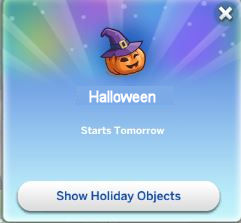
Then, the day before the holiday, you will receive notification of the upcoming theme so that you can decorate your house/lot.
Show Holiday Objects Option
Having a few extra holidays to the calendar makes the seasons more fun.